If you're looking for a work management platform for your company right now, two names will almost certainly end up on your shortlist: monday.com and ClickUp. Both are far more than a simple task manager, both promise to bring your team's work into one place, and you'll find enthusiastic reviews of both.
Over the past years we've rolled out work management systems at dozens of companies, and we run our own company on one too. In this article we give you an honest comparison: where Monday is stronger, where ClickUp is, and why we chose ClickUp. Spoiler: price wasn't the deciding factor, because there's hardly any difference there. What decided it was how well the system connects to everything else, and what you get for the same money, especially when it comes to AI.
In short: which one is right for you?
- monday.com is enough if your team is small, your processes are simple, and you don't plan to connect the system to other software.
- ClickUp is the better choice in every other case: if you don't just want to track projects, but want to run your entire company in one system, on a platform that grows with your business. Projects, CRM, documentation, communication, time tracking, AI agents and automated data flows with other software, all in one place.
Monday vs. ClickUp comparison table
| Criteria | monday.com | ClickUp |
|---|---|---|
| Getting started | Quick, but hits a wall with more complex processes | Needs a well-planned setup, and grows with the company in return |
| Interface | Simple, colourful boards | Customisable: every team works in its own view |
| Views | Board, Kanban, Gantt, calendar, dashboard | List, board, Gantt, calendar, workload, mind map, dashboard and many more |
| Hierarchy | Workspace → board → item → subitem | Workspace → Space → Folder → List → Task → Subtask |
| Docs, knowledge base | Basic (monday Docs) | Strong Docs and wikis linked to tasks |
| Built-in chat | Board updates, comments | Full chat channels and direct messages |
| Time tracking | From the Pro plan | Already in the entry-level paid plan |
| Monthly automations | 250 actions (Standard) | 1,000 (Core) / 10,000 (Business) |
| AI credits | 1,000–3,000 / month for the whole account | 1,000–1,500 / user / month, pooled |
| AI agents | Sidekick, agents (from Pro) | Super Agents on every plan, paid from credits |
| n8n integration | 18 actions, 0 native triggers | 57 actions, 27 native triggers |
| Entry price | €9 / seat / month | $9 / user / month |
Where is monday.com a good fit?
To be fair: Monday has its strengths too, but mostly where the company is still small and its processes are simple.
1. A quick start for simple processes. A non-technical team can get going within a few hours; the colourful status columns and drag-and-drop boards speak for themselves. As long as the work can be described with a few columns, that's convenient. But as soon as custom processes, permissions or data flows between systems come into play, companies quickly outgrow Monday.
2. Visual boards. The board-based approach is visually strong: a manager can see at a glance where things stand, as long as the data stays inside the board. When the full picture needs data from other systems, that view falls short.
3. Separate products for separate purposes. Monday offers separate products for CRM (monday CRM), development teams (monday dev) and customer service (monday service). That looks convenient at first, but it also means different parts of your company live in different products. In ClickUp, the same can be done within a single workspace.
Why is ClickUp stronger?
1. One system that can really handle everything. ClickUp isn't just a project management tool: tasks, docs, wikis, chat, time tracking, goals, forms, whiteboards and dashboards all live in one place. That's why we can roll out ClickUp not as a PM tool, but as a company management system. We wrote about this in more detail here: ClickUp as an ERP system?
2. Flexible hierarchy and custom fields. With the Space → Folder → List → Task structure and custom fields, you can model a law firm's case management, an engineering firm's project phases or an agency's CRM precisely, without any development.
3. Many views on the same data. The same task list can be a list, Kanban board, Gantt chart, calendar or workload view at the same time. Everyone works in the view that suits them, while the data stays in one place.
4. More features for the same price. List prices are almost identical, but ClickUp's entry plan already includes time tracking, custom fields, chat and 1,000 automations a month. In Monday, some of these are only available on more expensive plans.
5. AI and integrations. These are the two areas where the difference is biggest, so they get their own sections.
ClickUp's only real challenge is that all those options need a well-thought-out structure. In a professionally built workspace you don't feel it at all: everyone sees only what they need, while the system still handles the whole company's operations. That's why a good implementation matters so much, and that's exactly what we help with.
AI: this is where the gap is biggest
Both platforms market themselves as AI platforms, but ClickUp has clearly invested much more heavily in this area, and more importantly: it gives you far more AI for the same price.
Super Agents: AI teammates, not just a chatbot. ClickUp's Super Agents can work as full members of your workspace: you can @mention them, assign tasks to them, they remember previous work, and they see the full context of tasks, docs and conversations. A Super Agent can, for example, write the status report for every client project each Friday, or route incoming requests to the right person. What it did is logged and governed by permissions.
A much bigger AI allowance. Monday gives the whole account 1,000 (Basic), 2,000 (Standard) or 3,000 (Pro) AI credits per month. In ClickUp, the allowance comes per user, pooled across the workspace: 1,000 credits per person per month on Core, 1,500 on Business. For a 10-person team, that means 15,000 credits on ClickUp Business versus 3,000 on Monday Pro, at roughly the same licence price. If you want AI agents to do real work, you'll feel this difference quickly.
Connected Search: find company files from inside ClickUp. In plain terms: you search for something in ClickUp, and it finds it not only among ClickUp tasks and docs, but also in files and messages stored in Google Drive, OneDrive, Gmail, Slack or Teams. No more hunting in five different places for that contract or proposal. And the AI can answer using these sources too.
Integrations: the deciding difference in n8n
A work management system is only worth as much as the data you don't have to copy into it and out of it by hand. Invoicing software, CRM, web forms, accounting, HR software: if these don't talk to each other, someone in your company is doing that work manually.
We build our automations primarily in n8n, because it's open source, can run on your own server, and has no per-execution fees. When we try to solve the same task with Monday and with ClickUp, the difference is visible the moment you open the nodes:
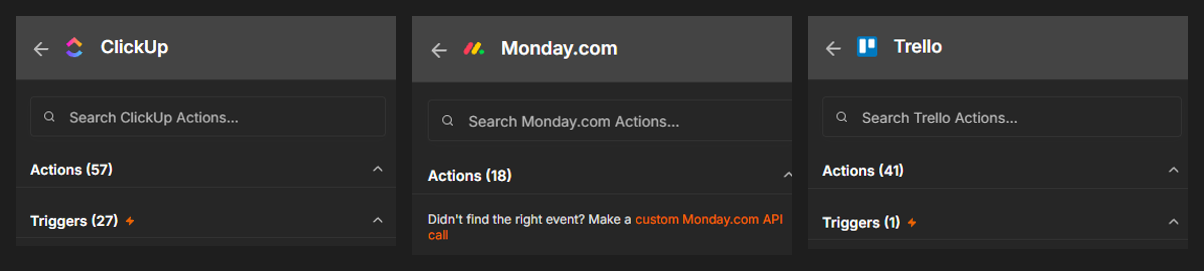
- ClickUp: 57 actions and 27 triggers. Tasks, lists, folders, comments, custom fields, time entries, tags, dependencies – almost everything can be handled without writing code. And the 27 native triggers mean a workflow starts instantly when a task is created in ClickUp, changes status, gets a comment or has a field updated.
- monday.com: 18 actions, no native trigger. If the built-in operations aren't enough, you have to write custom calls to Monday's GraphQL API. If a Monday event should start a process, you have to set up and maintain the webhook by hand.
- Trello: 41 actions, 1 trigger. Fairly easy to work with, but you have to filter a single generic trigger to figure out what actually happened.
What does this mean in practice? Take our own invoice reader automation: AI extracts the data from an incoming invoice, and it lands automatically in a ClickUp CRM, under the right client, with custom fields filled in. With ClickUp, that's a few drag-and-drop nodes. With Monday, the same thing means writing GraphQL queries, watching the API's complexity limits and more points of failure. If you want to see what this looks like for your company, check out our AI invoice processing service.
For one automation, the difference is just a few hours. For twenty automations, it's weeks of development time and a much more fragile system.
Pricing: this isn't where it's decided
It's hard to choose between the two platforms based on price, because the list prices almost overlap (as of October 2026, billed annually):
| Plan | monday.com | ClickUp |
|---|---|---|
| Free | Up to 2 seats, 3 boards | Unlimited members |
| Entry | Basic: €9 / seat / month | Core: $9 / user / month |
| Mid | Standard: €12 / seat / month | Business: $17 / user / month |
| Upper | Pro: €19 / seat / month | Enterprise: custom pricing |
The difference isn't on the price tag, but in what's included in the price:
- Automations: Monday's Basic plan has no automations; Standard includes 250 automation actions and 250 integration actions per month. ClickUp Core runs 1,000 automations a month, Business 10,000.
- Time tracking: in Monday it's available from the Pro plan, in ClickUp already on Core.
- AI: as described above, ClickUp gives you the AI allowance per user, Monday per account.
- Licensing: with Monday you subscribe to a preset team size (seat bundle); with ClickUp you pay for the users you actually invite.
And if you build your integrations in n8n, n8n does the heavy lifting, so you don't burn through either platform's automation quota.
Why did we choose ClickUp?
We grew fast, and we had to transform fast. As our team and client base grew, our processes changed month by month: new departments, new services, new systems that our work had to connect to. We needed a platform that could keep up with that pace without starting over at every change. What we've seen is that wherever a company is growing and more and more data has to move between systems, the ClickUp + n8n combination scales much better in the long run.
Within that, four concrete reasons decided it:
- Integrations. As shown above, ClickUp is by far the best-supported work management platform in n8n. Every client project we do involves automation, so this isn't a matter of convenience, it's a business decision.
- Company management, not just project management. In ClickUp, CRM, projects, time tracking, documentation and internal communication all live in one system. In Monday, that often takes several separate products or external tools.
- AI that actually works. With Super Agents and Connected Search, AI isn't an add-on button, it's part of the team, and there's plenty of allowance for it.
- Flexibility. A law firm, an engineering firm and a marketing agency work with completely different processes. ClickUp can be fitted precisely to each of them. Good examples are the system we built for the Jalsovszky Law Firm and a marketing agency's ClickUp CRM implementation.
And perhaps most importantly: we run on it ourselves. We operate our own company on ClickUp and n8n, and we've automated most of our financial admin too: A robot became our finance team. What we recommend to our clients is what we use every day: Our own ClickUp operating system.
What about Trello and Asana?
Trello and Asana are both excellent tools, but for one thing: project management. And that's exactly where their limit is.
Every year we move around five companies from Trello and Asana to ClickUp, and we almost always see the same pattern: next to the PM tool there's a whole ecosystem of Excel spreadsheets. One Excel for clients, one for working hours, one for billable items, one for holidays, one for purchases. The Trello card only says "in progress"; the real data lives on a shared drive, on the seventh tab of a spreadsheet, and there's always one person who "knows which version is the latest".
The reason is simple: Trello and Asana manage tasks, not companies. They don't have the depth of custom fields, database-like logic, time tracking and reporting needed to replace those spreadsheets.
With ClickUp, that changes. Clients go into a CRM list, time is tracked on tasks, billable items are compiled automatically, and reports appear on real-time dashboards. That's why our goal with each migration isn't to move Trello boards into ClickUp, but for your company to get a real company management system instead of a project management tool.
And the result is always the same: once you switch to ClickUp, nothing lives in Excel anymore.
Frequently asked questions
Which is better, Monday or ClickUp? If your company wants to grow, works with custom processes, or you want to connect your work to other systems: ClickUp. For the same price it gives you more features, far more AI and much better integrations. Monday is mostly enough for small teams and simple, visual project tracking.
Which one is cheaper? List prices are almost identical (both start at around 9 euros/dollars per user per month). The difference is in how many automations, how much AI allowance and which features you get for the price, and that's where ClickUp gives you more.
Can I migrate from Monday to ClickUp? Yes. ClickUp has a built-in importer, but more complex structures, custom fields and automations are best moved in a planned way, with an expert.
Which one works better with n8n? ClickUp. n8n's native ClickUp node offers 57 actions and 27 triggers, the Monday node 18 actions, with no native trigger.
How long does a Trello or Asana → ClickUp migration take? For a small or mid-sized company, typically a few weeks, including process assessment, structure design, data migration and team training.
Summary
monday.com is a good tool for simple, visual project tracking. ClickUp, for the same price, can bring a whole company's operations into one system, put AI agents to work, and connect to all your other software. For a growing company, that gap gets bigger every month, and that's why we work with ClickUp.
If you're moving from Trello, Asana, Monday or Excel and want a system that's truly built around your processes, take a look at our ClickUp onboarding service, or get in touch. We work in English, German and Hungarian.